
1 Import a Data File
Click Import Excel / CSV in the upper-left corner and select a local file.
The .xlsx format is recommended. For simple single-table data, .csv files can also be used.
After import, the system performs the following steps:
- Reads worksheets and column headers.
- Converts each worksheet into a data table.
- Uses the first row as field names.
- Infers field types from sample data.
- Detects primary-key and foreign-key candidates.
- Infers relationships between tables.
- Generates a UML model on the central canvas.
2 Review the Data Model
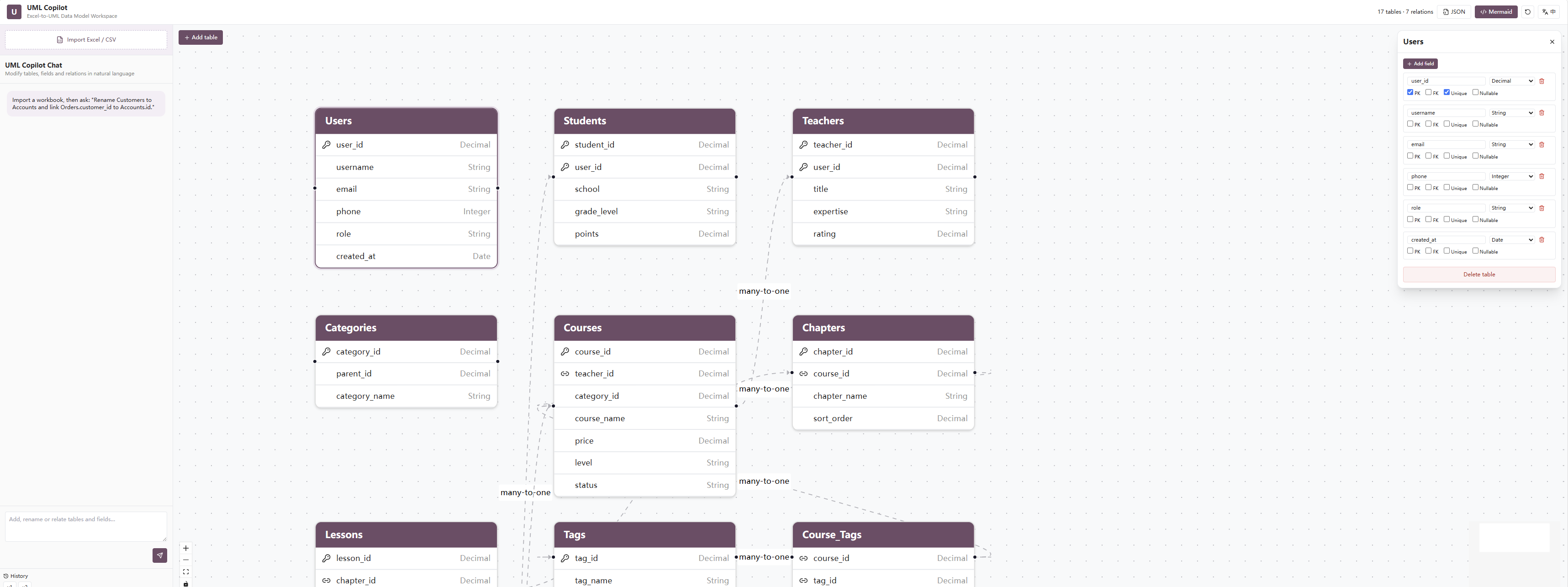
After import, each data table is displayed as an individual card.
Icons and visual states generally indicate the following:
| Icon or State | Meaning |
|---|---|
| Key icon | Primary key |
| Link icon | Foreign key or related field |
| No icon | Regular field |
| Line between tables | Field relationship |
| One-to-many / many-to-one | Relationship cardinality |
The canvas supports zooming, panning, and automatic view fitting, making it suitable for large data models.
3 Modify the Model with Natural Language
Enter an instruction in the conversation box on the left and click Send.
Add a Table
Add a Suppliers table with supplier_id, supplier_name, contact_name, phone, and status fields.
Rename a Table
Rename the Users table to Customers.
Add a Field
Add a remark field of type text to the Orders table.
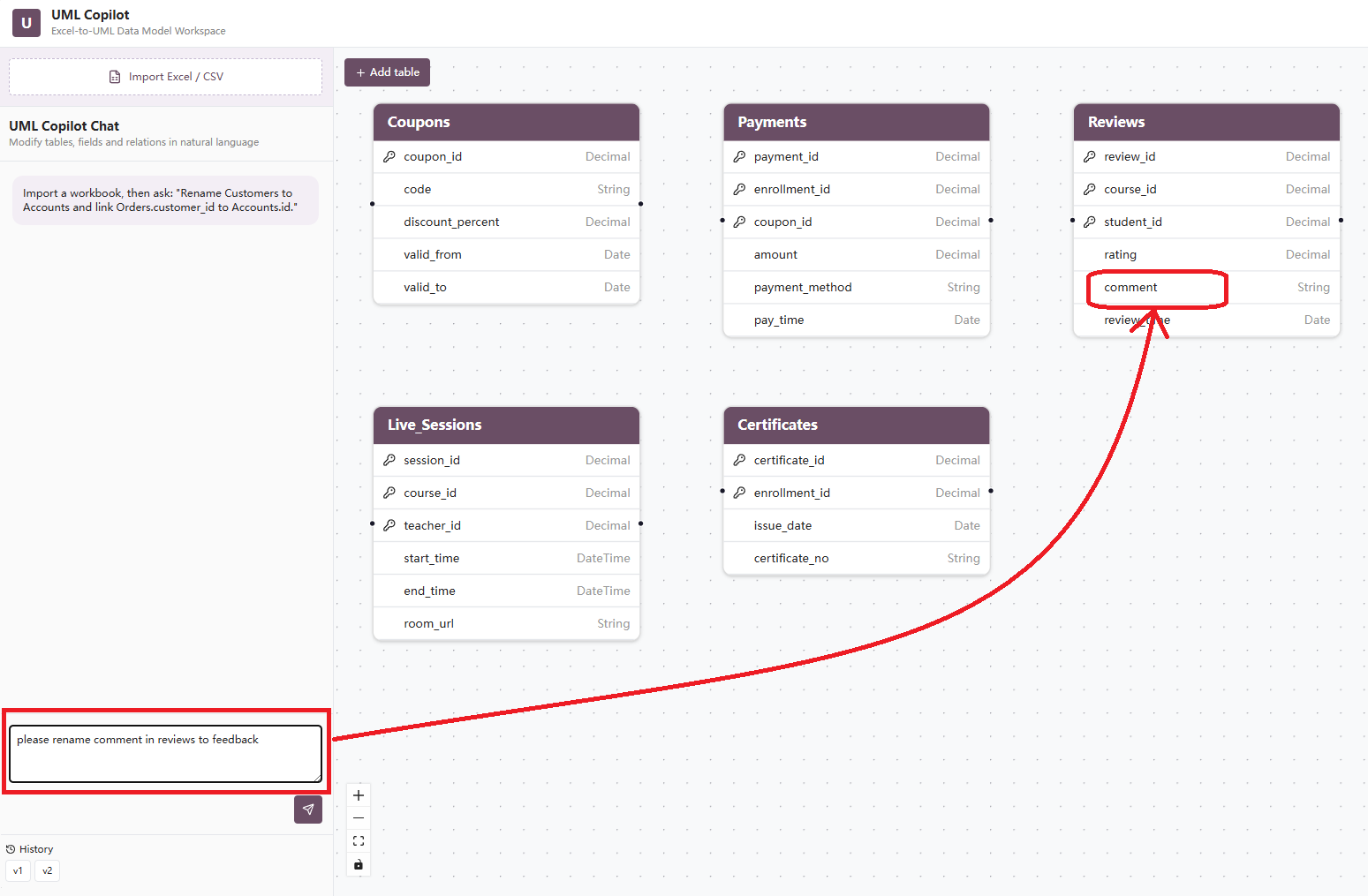
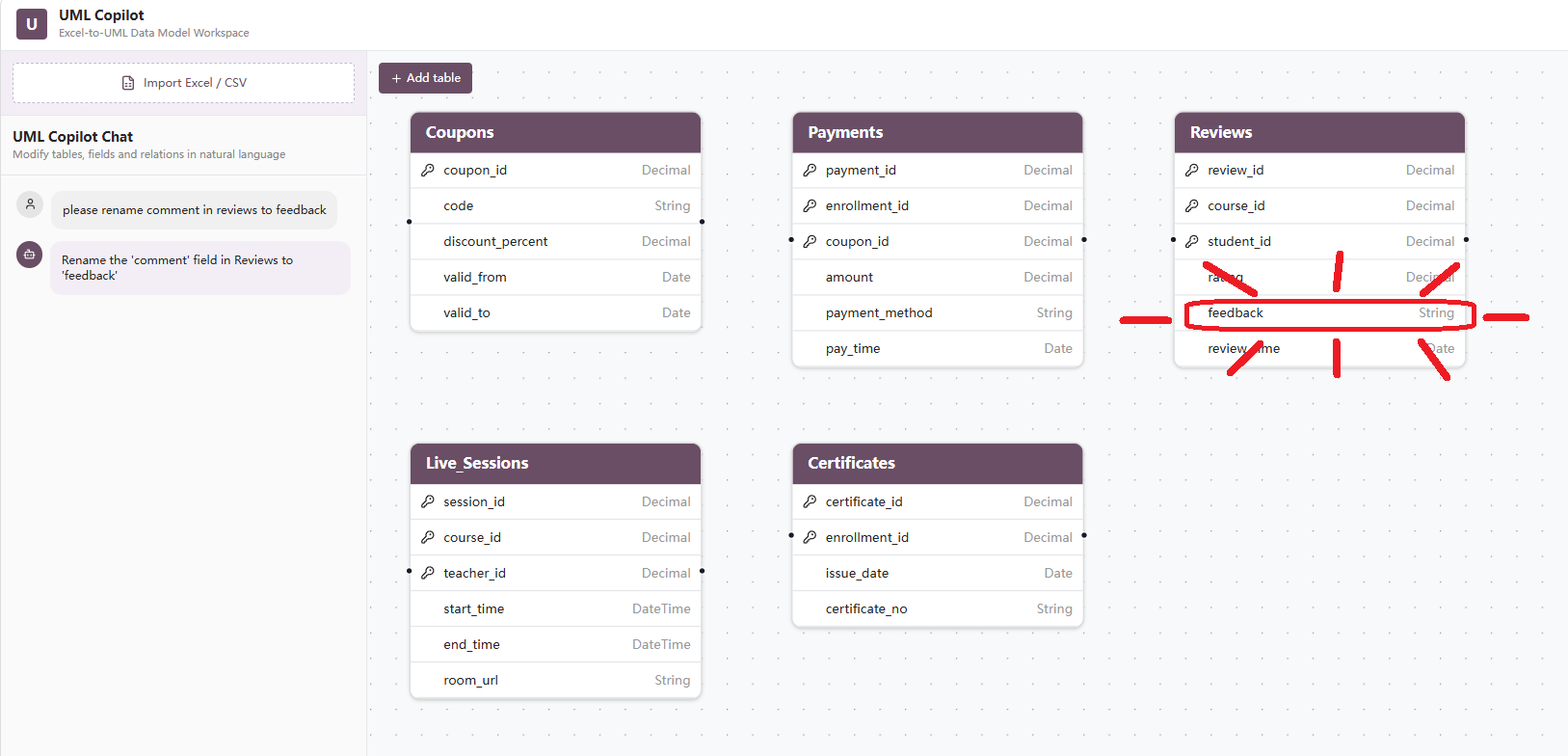
Rename a Field
Rename Products.product_name to name.
Change a Field Type
Change the field type of Products.price to decimal.
Delete a Field
Delete the Users.level field.
Create a Relationship
Link Orders.user_id to Users.user_id.
Remove a Relationship
Remove the relationship between Orders.address_id and User_Address.address_id.
4 Add a Table Manually
Click Add Table above the canvas to create an empty table.
You can then use the conversation panel to define its name and fields:
Rename the new table to Invoices and add invoice_id, order_id, invoice_no, amount, and issue_date fields.
5 Adjust the Canvas
Use the controls in the lower-left corner of the canvas to:
- Zoom in
- Zoom out
- Fit the model to the canvas
- Restore the default view
- Lock or unlock editing
For large models, use the minimap in the lower-right corner to quickly locate a target table.
6 Undo and Version History
Use the Undo button in the top toolbar to revert the most recent change.
The version history area in the lower-left corner may display versions such as:
v1
v2
v3
Version history can be used to:
- Compare models before and after changes
- Restore accidentally deleted tables or fields
- Preserve alternative business designs
- Record requirement review iterations
7 Export the Model
Export as JSON
Click JSON in the top toolbar to export the structured model data.
JSON output can be used for:
- Model storage
- Frontend-backend data exchange
- Secondary development
- Database script generation
- ORM model generation
- Odoo model generation
Example:
{
  "tables": [
    {
      "name": "Users",
      "fields": [
        {
          "name": "user_id",
          "type": "integer",
          "primaryKey": true
        },
        {
          "name": "username",
          "type": "string"
        }
      ]
    }
  ],
  "relations": []
}
Export as Mermaid
Click Mermaid in the top toolbar to generate Mermaid ER diagram code.
Example:
erDiagram
    USERS ||--o{ ORDERS : places
    USERS ||--o{ USER_ADDRESS : owns
    ORDERS ||--|{ ORDER_ITEMS : contains
    PRODUCTS ||--o{ ORDER_ITEMS : referenced_by
Mermaid code can be used directly in:
- GitHub README files
- Gitee README files
- Markdown documents
- Technical design documents
- Project wikis
- Online Mermaid editors
4. Building the Excel Workbook
To improve recognition accuracy, prepare the Excel file according to a consistent structure before importing it.
4.1 Recommended Structure
The recommended convention is:
One worksheet represents one data table.
Example workbook:
ecommerce_model.xlsx
├── Users
├── User_Address
├── Categories
├── Products
├── Orders
├── Order_Items
├── Payments
└── Logistics
The worksheet name is used as the default table name.
4.2 Column Headers
The first row of each worksheet should contain field names. Sample data should begin from the second row.
Users Worksheet
| user_id | username | phone | level | created_at | |
|---|---|---|---|---|---|
| 1 | Alice | alice@example.com | 13800000001 | VIP | 2026-07-01 |
| 2 | Bob | bob@example.com | 13800000002 | Normal | 2026-07-02 |
Orders Worksheet
| order_id | user_id | address_id | order_time | total_amount | status |
|---|---|---|---|---|---|
| 10001 | 1 | 101 | 2026-07-10 10:30:00 | 299.00 | paid |
| 10002 | 2 | 102 | 2026-07-11 14:20:00 | 499.00 | shipped |
4.3 Table Naming Conventions
Use one consistent naming style, such as:
Users
User_Address
Order_Items
or:
users
user_address
order_items
Recommendations:
- Use English names
- Avoid spaces
- Avoid special characters
- Keep singular/plural conventions consistent
- Avoid mixing Chinese, English, and pinyin
- Use names that clearly describe the business entity
Not recommended:
Table1
Sheet1
User Table
order-items!
4.4 Field Naming Conventions
The lowercase snake_case convention is recommended:
user_id
product_name
order_time
total_amount
created_at
Recommendations:
- Name a primary key as
singular_table_name_id - Keep foreign-key names consistent with the referenced primary key
- Use
_time,_date, or_atfor date and time fields - Use
statusconsistently for status fields - Use
is_,has_, orenable_prefixes for Boolean fields
Examples:
is_default
is_active
has_invoice
created_at
updated_at
4.5 Field Type Inference
The system infers field types from the content in Excel.
| Excel Content | Recommended Inferred Type |
|---|---|
| 1, 2, 3 | integer |
| 12.5, 299.00 | decimal / float |
| User names, addresses, descriptions | string / text |
| 2026-07-24 | date |
| 2026-07-24 10:30:00 | datetime |
| TRUE / FALSE | boolean |
To avoid incorrect inference, sample values within the same column should use a consistent data type.
Not recommended:
| amount |
|---|
| 100 |
| 200.5 |
| N/A |
| Undetermined |
Recommended:
| amount |
|---|
| 100.00 |
| 200.50 |
| 0.00 |
| 350.00 |
4.6 Primary-Key Design
Each table should have a unique primary key.
Examples:
Users.user_id
Products.product_id
Orders.order_id
Payments.payment_id
A primary key should be:
- Unique
- Non-null
- Type-stable
- Unlikely to change with business content
Names, phone numbers, and product names should not normally be used directly as primary keys.
4.7 Null Values and Sample Data
The system may use sample data to infer field types and relationships. Each worksheet should therefore contain approximately 2–10 valid sample rows.
Important guidelines:
- Do not merge cells
- Do not place description rows above the header
- Do not place multiple independent tables in one worksheet
- Do not use colors as the only representation of field meaning
- Do not insert summary or total rows in the data area
- Avoid completely empty columns
- Use a consistent date format
4.8 Multi-Worksheet Excel Example
Users
  user_id
  username
  email

Products
  product_id
  category_id
  product_name
  price

Orders
  order_id
  user_id
  order_time
  total_amount

Order_Items
  item_id
  order_id
  product_id
  quantity
  unit_price
After import, the system can generate a model containing relationships among users, products, orders, and order items.
5. Field Relationships
Field relationships describe data dependencies between tables.
5.1 Primary Keys and Foreign Keys
A primary key uniquely identifies a record.
Example:
Users.user_id
A foreign key references the primary key of another table.
Example:
Orders.user_id -> Users.user_id
This relationship means that each order belongs to one user.
5.2 One-to-One Relationships
One record in the primary table corresponds to at most one record in the related table.
Example:
Users.user_id -> User_Profile.user_id
Typical use cases:
- User and user profile
- Employee and employee extension information
- Order and unique invoice
Natural-language instruction:
Define a one-to-one relationship between Users.user_id and User_Profile.user_id.
5.3 One-to-Many Relationships
One record in the primary table can correspond to multiple records in the related table.
Example:
Users.user_id -> Orders.user_id
This means that one user can have multiple orders.
Orders.order_id -> Order_Items.order_id
This means that one order can contain multiple order items.
Natural-language instruction:
Create a one-to-many relationship between Users and Orders using Users.user_id and Orders.user_id.
5.4 Many-to-One Relationships
A many-to-one relationship is the reverse perspective of a one-to-many relationship.
Examples:
Multiple Orders records -> One Users record
Multiple Products records -> One Categories record
Natural-language instruction:
Set Products.category_id as a foreign key referencing Categories.category_id.
5.5 Many-to-Many Relationships
A many-to-many relationship is normally implemented through a junction table.
For example, Orders and Products are connected through Order_Items:
Orders
  |
  | 1:N
  |
Order_Items
  |
  | N:1
  |
Products
Corresponding fields:
Order_Items.order_id -> Orders.order_id
Order_Items.product_id -> Products.product_id
Natural-language instruction:
Use Order_Items as the junction table to create a many-to-many relationship between Orders and Products.
5.6 Self-Referencing Relationships
A table can also reference itself.
Example of a category hierarchy:
Categories.parent_id -> Categories.category_id
This means that a category can have one parent category and multiple child categories.
Natural-language instruction:
Link Categories.parent_id to Categories.category_id to create a hierarchical category structure.
5.7 Relationship Detection Rules
The system can infer relationships from the following characteristics:
- Matching field names
- Fields ending in
_id - Foreign-key names that correspond to table names
- Clear value containment between two columns
- Semantic correspondence between worksheet names and field names
Example:
Orders.user_id
Users.user_id
The system may infer:
Orders.user_id -> Users.user_id
5.8 Relationship Design Recommendations
When creating relationships, ensure that:
- Primary-key and foreign-key types are consistent
- Foreign-key names have clear business meaning
- Duplicate relationships are not created
- Many-to-many relationships use a junction table
- Unstable business fields are not used as relationship keys
- Existing relationships are reviewed before deleting a field
- Foreign keys are updated when a referenced primary key is renamed